Wednesday, 25 July 2012

Announcing: MapGuide Maestro 5.0 beta 3 and 4.0.2 maintenance release

Here's a long overdue update which includes the following changes

Secured Credential Support (5.0b3 and 4.0.2)

A major client-side security hole has been plugged. All applicable Feature Source editors now secure login credentials by default. Maestro will no longer create Feature Sources with plaintext credentials.

If your FDO provider uses login credentials but does not have a specialized editor, no worries. The generic editor also supports specifying secured credentials. A new "Set Credentials" link is available.


Click it and you get a new dialog that lets you nominate the username and password connection properties and their respective values. These values are saved to MG_USER_CREDENTIALS and are replaced in the connection properties with the %MG_USERNAME% and %MG_PASSWORD% placeholder tokens.


However, we still have problems packaging such feature sources (we lose the encrypted MG_USER_CREDENTIALS in the packaging process due to design limitations). The only workaround for packaging such feature sources, is the use the official method via the Site Administrator. New validation rules have been added to warn you about such feature sources.


Theme Improvements (5.0b3 and 4.0.2)

If you know how theming works, it's just taking a given rule and duplicating it a certain number of times with various different fills and/or border colors based on a given set of matching rules. To this end, Maestro now let's you use the first style rule as a template for generating the theme.


Live Map Editor improvements (5.0b3)

The Live Map Definition editor now shows all Layers and Groups regardless of visibility, which is important because you need to be able to "see" all the Layers and Groups that you can edit. Such layers and groups are greyed out to distinguish from the visible Layers and Groups.


The map viewer component also has many of the viewer enhancements ported over from mg-desktop, so yes! The Live Map Definition Editor can now do mouse wheel zooming among other things.

The mg-desktop wrapped implementation of the Maestro API now also includes a wrapper for the Runtime Map, meaning Map Definitions in a mg-desktop repository can now also be edited by the Live Map Definition Editor.

Other tweaks and enhancements (5.0b3)


The Point Feature Style dialog now uses tabs for screen space optimization.


For SDF and SHP Feature Sources, we now label what that file and folder buttons stand for


The status bar now shows the active connection, as some commands operate against the active connection and it helps to know what that connection is.


And finally, that bug is also fixed. You can stop asking about it :) And ODBC configuration works again for 4.0.2.


Download

Sunday, 15 July 2012

New mg-desktop binaries (now with comprehensive sample code)

This latest drop of mg-desktop still doesn't do tiled maps (I've got a basic idea at the moment, which involves using BruTile), but it does have the following new features and fixes:

  • Lots of internal traces added to mg-desktop. If you turn on internal trace logging in Platform.ini, your Trace.log should be filled with much more useful information now. Note that you only need to turn on internal trace logging if you need to do some serious debugging. This is turned off by default in Platform.ini
  • Support for secured Feature Source credentials
  • We do basic XML content validation with our implementation of MgResourceService. The checks are currently for well-formedness of content and that top-level element matches resource type.
  • APIs in our implementation of MgFeatureService (namely GetClasses and GetClassDefinition) now work properly with extended feature classes.
  • Plenty of viewer and component fixes
But the most important change is that the sample App Layout in the binary distribution now includes a comprehensive set of examples in how to use the mg-desktop API. Basically we ripped out the MapGuide Developer's Guide samples and stuffed them into the App Layout extension model.


The interesting thing about this was that the sample code was that it was mostly copy and pasted from the MapGuide Developer's Guide samples with the ASP.net stuff replaced or removed, which goes to show the striking similarity of mg-desktop's APIs with the official MapGuide APIs, which is 100% intentional.

The source code for this sample extension is also available for download

Wednesday, 11 July 2012

A note about Maestro's Package Builder and feature source credential security

If you use Maestro to create packages, be careful when working with Feature Sources using %MG_USERNAME% and %MG_PASSWORD% tokens.

Because Maestro is 100% managed code, we do not have the ability to portably access the C++ logic that encrypts/decrypts the MG_USER_CREDENTIALS resource data element, which is used to store the encrypted username/password you specified when creating that Feature Source and is decrypted by the MapGuide Server when it needs to establish a connection to this feature source. This is mostly applicable to feature sources that have username and/or password as part of its connection parameters (ie. RDBMS providers)

This is the reason Maestro stores such credentials in plaintext as part of the feature source XML, which is understandably not secure. Until we have a solution for encrypting MG_USER_CREDENTIALS in pure managed code (ie. A verbatim .net version of MgCryptographyUtil with 100% matching behaviour), storage of credentials as part of the XML content in plaintext is the only thing Maestro can do if you ever want to be able to create such feature sources with it.

If you attempt to package such feature sources with Maestro, it will pack MG_USER_CREDENTIALS resource data unencrypted. Maestro does a series of GETRESOURCECONTENT and GETRESOURCEDATA calls to assemble the package. Doing a GETRESOURCEDATA on MG_USER_CREDENTIALS will return you the un-encrypted username (MapGuide Server will auto-transform such requests), this is what gets packaged by Maestro which is incorrect. This doesn't happen with MapGuide's packaging as it obviously works behind the scenes and can retain the encrypted form of MG_USER_CREDENTIALS

Having just said that, it is probably impossible "by design" to create a package client-side with properly encrypted credentials as the mere act of fetching the MG_USER_CREDENTIALS resource data will automatically give you back the decrypted version. If you ever get a MgDecryptionException trying to load a Maestro-created package, it is because that package contains plaintext MG_USER_CREDENTIALS resource data instead of the encrypted version.

As an interim measure, Maestro will have a new validation rule that warns you about such Feature Sources, so you know that you are dealing with this particular problem. If this issue (Maestro creating feature sources with plaintext credentials and creating packages such feature sources incorrectly) is a problem for you, your options currently are:

  1. Always use MapGuide/Infrastructure Studio to create and/or re-secure such feature sources. Of course if you don't have a licensed copy of Studio, you are totally out of luck here. You'll have no choice but to create feature sources with credentials exposed in plaintext in the XML content.
  2. Always use the official packaging method (ie. with the Site Administrator) for such feature sources to retain the encrypted feature source credentials.
If Maestro was windows-only, the solution would be easy as we can just use some C++/CLI glue to tap into MapGuide's existing encryption/packaging logic. SWIG and/or P/Invoke though portable is un-proven because getting .net code to call into a glue layer (whether generated by SWIG or a hand-crafted C interface) into MapGuide's encryption/packaging logic on Mono in Linux/Mac is a very tall order!

As you can see, this is a very complex problem with plenty of pros and cons on the current set of proposed solutions. Need to think about this some more.

Monday, 9 July 2012

MapGuide Open Source 2.4 RC1 released

Get all the information and downloads from here

This includes plenty of viewer (AJAX and Fusion) and schema report fixes from beta 1. Just like the beta 1 release, this does not include the ArcSDE provider. We hope to get an official FDO 3.7 release out before we put out the final release of MapGuide Open Source 2.4

Also here's a sight for sore eyes


Yeah, RC1 can serve working KML again!

Tuesday, 3 July 2012

Using SQL Server Management Studio to preview WKT geometry

Here's a little trick I discovered with SQL Server Management Studio today trying to visualise some bounding boxes.

Since the 2008 version, SQL Server has has support for spatial data. This support also extends to associated tooling like Management Studio. Any query you run against a table/view that contains a geometry/geography column will also show the results visually in the Spatial results tab.


It also turns out queries that return adhoc rows of geospatial data also work in this fashion, for example the result of geometry::STGeomFromText(). These queries don't even have to be against actual tables/views!


These results can also be aggregated together using the SQL UNION ALL keyword.


And because the Spatial Results view can use any non-spatial column for labeling, you can also include arbitrary text as part of the select query to "label" each associated geometry.


Pretty nifty!

Saturday, 30 June 2012

Thoughts on MapGuide scalability

I've been doing some automated stress testing on the MapGuide 2.4 beta. The tool I used was Bruno Scott's scripts for the Grinder load testing tool. Running these stress tests have given me more insight into tweaking serverconfig.ini values for greater scalability, which I am sharing in this particular post.

For the record, the system I'm running the grinder test from (and where all these images in this post are sourced from) is a Quad Core desktop running 64-bit Windows 7 with 8GB RAM, which also happens to a have a Google Chrome browser with several tabs open (one for writing this post :-)), and the box isn't breaking a sweat.

Salt. Take a few grains of it


Like my post about MapGuide's undocumented expression functions, don't take my word as gospel. Most of my insights are from a 200 user automated stress test that is running as I'm writing this. Normal users do not operate like java threads following pre-determined scripts in a grinder test run, you will have a mix of heavy users, light users and users in between. Rather, consider this post as a data point from which you can extrapolate from to form your own conclusions about the optimal server configuration settings for a high volume environment.

The default settings will not cut it

Let me say off the bat that the default serverconfig.ini is definitely not optimized for serving high volumes of users. My first grinder test run simulating 50 users breached the session repository limit within 2 minutes! Gradual tweaks to serverconfig.ini has made the MapGuide Server more resilient to high volume requests. A 200 user grinder test is running as I write this post with no crashes or noticeable errors (the only errors thus far are insignificant IO errors due to the fact that I've capped the size of the request logs).

Read on to see what needs changing.


# of Session Repositories = Your "available memory"


Each time a new session is created (eg. Login with Studio/Maestro or launch the map viewer), a new session repository file is created. The SessionRepositoriesLimit setting in serverconfig.ini defines the maximum number of session repository files that can exist at any one time. If the MapGuide Server breaches this limit, it will deny any further CreateSession requests until the number of session repositories goes under this limit.

You can actually count the number of sessions that are active by looking at the Repositories/Session folder of your MapGuide Server install directory. Each session takes 2 files (a .db file and a .dbxml file), so the math is not rocket science.


How does this number go down then? Through MapGuide's session expiry mechanism. Every time a session expires, MapGuide will delete the related session repository file. So to ensure a stable MapGuide Server in a high volume environment, you need to keep this number in check, and the way to do that is to strike a fine balancing act between session creation and session expiry to ensure that this number stays steady.


This is somewhat analogous to memory allocation in a managed programming language. If you are allocating memory at a rate faster than the garbage collector can clean up, you will eventually get an out-of-memory error thrown by the runtime. Same principle here. MapGuide's session expiry is your "garbage collector"


Simply put, you will need to be more aggressive with your session expiry settings. Here's the default values in serverconfig.ini


  • SessionTimeout                     = 1200
  • SessionTimerInterval               = 400


A session is considered expired if nothing is done with that session id within 1200s (20mins) and that expiry check is done every 400s (6m40s). In the case of our automated stress test, this is way too long a period to wait to start cleaning up, which is why the grinder test was able to hit the limit in only 2 minutes. We lowered the SessionTimeout to 200s (3m20s) and the SessionTimerInterval to 60s (1min). This allowed the MapGuide Server to reclaim expired sessions at a rate that the automated stress test was creating them resulting in a steady number of active session repositories.

From a user perspective, there shouldn't be any problems with unexpected expired session errors. Maestro and the AJAX/Fusion viewers already have keep-alive mechanisms built in to ensure your session is not cleaned up due to aggressive session expiry settings.


Server memory use correlates to # of active sessions.


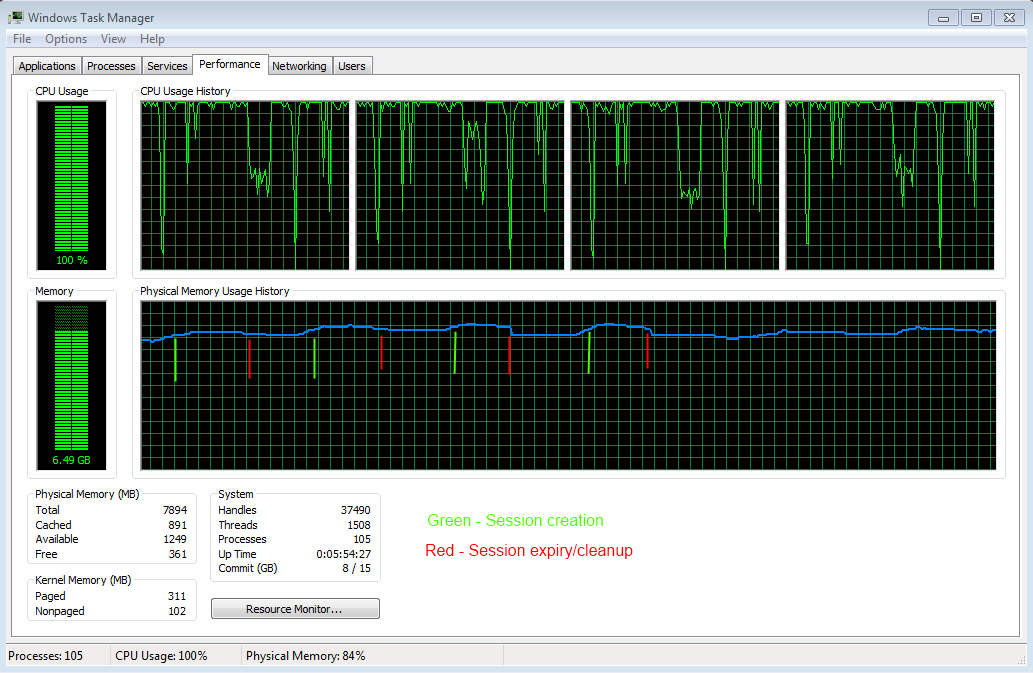
The memory allocation analogy for active sessions is somewhat rooted in fact. Each active session will take up memory, but each expired session will also release it. If you take a look at the task manager


The graph of memory goes in a steady up-and-down fashion in line with the session creation from the stress test (going up) and session expiry/cleanup (going down). The default session timeout settings would result in sharper drops in memory usage, but you would probably already hit the session repository limit before that happens.

Don't bother with 32-bit MapGuide

Here's the memory usage from the 200 user automated grinder test currently running as I'm writing this post


4GB like 640KB before it, was thought to be enough for everybody. But as you can see by the memory usage, a 32-bit MapGuide Server will be hitting its upper memory limit quite easily on a 32-bit system. So there is no real point in having a 32-bit MapGuide Server for a high volume environment. You should be running 64-bit MapGuide which can support and address an astronomical amount of memory (so yeah you're in a bit of a pickle if you are using or considering Linux as we still don't offer 64-bit MapGuide linux builds yet).

Conclusion (TL;DR)
  • The default serverconfig.ini will not cut it. You will have to edit this file.
  • Crank up the session repository limit as high user volume can easily breach the default limit (my stress test uses a SessionRepositoriesLimit of 4000)
  • Lower the session expiry timeout and checking interval (my stress test uses a SessionTimerInterval of 60 and a SessionTimeout of 200) to ensure expired sessions are reclaimed faster.
  • If the numbers are steady (memory usage, number of session repo files), that's a good thing!
  • Use 64-bit MapGuide. Don't bother with the 32-bit one. Throw as much RAM as you can. More users = More RAM.

Thursday, 28 June 2012

New mg-desktop binaries: There can be only one thing left to do now

With this latest release of mg-desktop we are now one item short of complete feature parity with the AJAX/Fusion viewer: Support for rendering tiled maps.

Since I have still yet to figure this one out, let's just talk about what's new in this release instead:

Logging

The MapGuide Server logging infrastructure has been ported over to mg-desktop so you have the same API, trace and error logging goodness that you get with the MapGuide Server

Connection Pooling


I had a review of the connection pooling in place for mg-desktop and it turns out that I wasn't doing it right. Poolable connections that are returned to the pool are not supposed to be closed. They are only supposed to be closed when the pool is torn down or the connection is booted out. It is for this reason that you probably couldn't get Raster layers to display in the mg-desktop map viewer until now, because closing these raster connections actually wiped out their loaded configuration documents, meaning Rendering and Stylization was working off of what was essentially un-configured Feature Sources.


So with this release, not only is connection pooling working properly, but it should have better support for displaying layers from Raster feature sources (ie. GDAL and WMS)


Mouse Wheel Zoom!


The viewer control now supports zooming with the mouse wheel. Nuff said.


Legend Enhancements


The legend control now supports toggling layer selectability like the AJAX viewer.


Digitization Enhancements


The viewer control includes new digitization APIs to let you customize the digitization prompt.


As you can also see from that prompt, for digitization which consists of multiple segments (ie. Line Strings and Polygons) the viewer now supports undoing of previous segments by pressing Ctrl-Z during digitization of a Line String or Polygon


So now to figure out how to do this tiled maps thing ...

Download